Sequins Metagenomics Core Control Set Tutorial: Taxonomic classification for unknown targets
This is an example workflow for processing short-read metagenomics sequencing data from samples which have had the Sequins Metagenomics Core Control Set spiked in. It highlights the places where Sequins specific steps must be taken, and it is not intended as an example of a production workflow. You should adapt each step to your own needs.
Obtain the tutorial resources
The necessary resources for this tutorial can be obtained by completing the request access form. These resources include the Sequins resource bundle, example sequencing data, and optionally a custom Kraken2 database with Sequins included.
Sequins resource bundle
The provided user bundle contains the following reference files:
-
metasequin_sequences.fa: A standard multi-FASTA file containing individual synthetic metagenomic sequences (Sequins), each represented as a separate FASTA entry. -
metasequin_decoy.fa: A concatenated version of the same sequences frommetasequin_sequences.fabut merged into a single pseudochromosome-style FASTA entry, with individual sequences separated by a stretch of N bases. This format facilitates compatibility with alignment tools that require a linear reference and is designed to be used in conjunction with the accompanying BED file. -
metasequin_regions.bed: Provides the precise coordinates demarcating the boundaries of each individual Sequins control withinmetasequin_decoy.fa. -
metasequin_abundances.csv: The abundance column represents the relative molar proportion of each Sequins control in the mixture — i.e. how much of each Sequins control was included in relation to the others. Once you know the total amount of Sequins spiked in (e.g. 1 ng), you can use these values to calculate the expected mass of each individual Sequins control. In other words, the abundance value does not represent an absolute unit like ng or copies/µL, but rather a proportional value to guide normalisation or expected abundance calculations. The length field is in base pairs (bp).
Tutorial example data
Sequins provides example data derived from short-read sequencing of a dog’s microbiome, subset to reduce file size for testing with the workflow. The files for running the tutorial include:
-
meta_taxonomy_tutorial_data_v1.1_R1.fastq.gz,meta_taxonomy_tutorial_data_v1.1_R2.fastq.gz: Raw FASTQ files for the example data. -
metasequin_abundances_example.csv: A metasequins abundances file with pre-computed ng/µL and copies/µL values for each Sequins control in the sample. -
functions.py: Python helper functions for normalising quantified read counts, plotting Sequins ladders, and calculating limit of detection/quantification.
Intermediary files from each analysis stage are included in the intermediatory_files/ subdirectory to allow continuation of the tutorial if any issues arise (e.g. tool installation or runtime errors). These include:
- FASTQ files after quality processing, plus associated reports.
- Kraken2 output files.
- Bracken output files.
- Outputs from the downstream Python analysis of the quantified Sequins.
The database_building/ directory contains helper scripts for building a custom Kraken2 database with Sequins included.
Custom taxonomic database
Taxonomic classification methods for metagenomics NGS data such as Kraken2 typically require a taxonomy database of some form to compare sequencing reads or assembled contigs against. To have a fully integrated analysis of Sequins and the sample data, Sequins will need to be integrated into the database, and we provide instructions on creation of a custom Sequins database for Kraken2 at the end of this tutorial (see Creating a custom taxonomic database ), although the process may differ for other tools.
As creating a custom Kraken2 database is highly resource-intensive, we recommend downloading the pre-built Sequins database. Please be aware that the database is large (92 GB uncompressed), and you will need sufficient disk space to store it. This database is built using the Metagenomics Core Control Set Sequins sequence and taxonomy information, along with the NCBI archaea, bacteria, plasmid, UniVec Core, viral and human databases, and is ready to use for taxonomic classification and abundance estimation with Kraken2 and Bracken.
Prepare your environment
Option 1: Self-serve comprehensive
Sequins provides a Docker container that has all dependencies pre-installed, this is the recommended way to run this tutorial. You can download the latest version of the image with:
docker pull ghcr.io/sequinsbio/meta_tutorial:1.1.0
NOTE: The Docker container only supports x86_64 architectures. If you’re running this tutorial on an ARM64 architecture (e.g., Apple Silicon), you should set the
DOCKER_DEFAULT_PLATFORMenvironment variable tolinux/amd64before running any Docker commands. This ensures that the container runs in an x86_64 emulation mode, which is necessary for compatibility with the tools included in the container.export DOCKER_DEFAULT_PLATFORM=linux/amd64Alternatively, you can add the option
--platform linux/amd64to every Docker command.
NOTE: If using a Docker container on a local machine, you may need to increase the memory limit for the container to ensure it has sufficient resources to run Kraken2.
Option 2: Independent tools
Alternatively, if you are unable to run Docker or would prefer to run the tools natively, you can install each dependency locally.
In this example workflow we use a number of popular bioinformatics tools that need to be installed. However, users should feel free to use alternative software tools and/or versions to suit their needs.
- fastp
- Kraken2 v2.17.1
- Bracken
- Python
- NumPy
- pandas
- seaborn
- statsmodels
- matplotlib
- biopython (for database building)
Running the workflow
The following steps will walk you through a basic workflow for performing taxonomic assignment and abundance quantification from shotgun metagenomic sequencing with Sequins spiked-in. You can follow along either running inside the 1) Docker container or 2) on your local machine. You can start the Docker container with:
docker run -it --rm -v "$PWD":"$PWD" -w "$PWD" -u "$(id -u)":"$(id -g)" \
   ghcr.io/sequinsbio/meta_tutorial:1.1.0
1. Perform quality control of raw sequencing data
Whether quality control and pre-processing is necessary and to what extent is dataset-specific and as such tools and parameters should be selected accordingly. Below is an example of adaptor/quality trimming and filtering of raw sequencing data with fastp:
fastp --in1 meta_taxonomy_tutorial_data_v1.1/meta_taxonomy_tutorial_data_v1.1_R1.fastq.gz \
    --in2 meta_taxonomy_tutorial_data_v1.1/meta_taxonomy_tutorial_data_v1.1_R2.fastq.gz \
    --out1 meta_taxonomy_tutorial_data_v1.1_R1.qc.fastq.gz \
    --out2 meta_taxonomy_tutorial_data_v1.1_R2.qc.fastq.gz \
    -q 20 -l 36 \
    --correction \
    --cut_tail \
    --trim_poly_x \
    --trim_poly_g \
    --json meta_taxonomy_tutorial_data_v1.1.fastp.json \
    --html meta_taxonomy_tutorial_data_v1.1.fastp.html
You may optionally consider removal of host DNA and/or PhiX if relevant for the sample, however this step has been performed already for the example data provided with this tutorial.
2. Taxonomic assignment and abundance estimation
Using your custom database ($DBNAME) and the processed data from the
previous step, you can now perform taxonomic assignment with Kraken2:
NOTE: Kraken 2 will by default load the database into process-local RAM, therefore requiring enough free memory to hold the database (primarily the hash table) in RAM. Using the –memory-mapping flag will avoid this, reducing RAM requirements but potentially slowing down classification. If using a Docker container on a local machine, you may need to increase the memory limit for the container to ensure it has enough resources to run Kraken2.
# Set path to the pre-built custom Kraken2 database
DBNAME="path/to/sequins_custom_database"

k2 classify \
   --db "$DBNAME" \
   --threads 8 \
   --memory-mapping \
   --report-zero-counts \
   --report meta_taxonomy_tutorial_data_v1.1.k2report.txt \
   --minimum-hit-groups 2 \
   --paired \
   meta_taxonomy_tutorial_data_v1.1_R1.qc.fastq.gz \
   meta_taxonomy_tutorial_data_v1.1_R2.qc.fastq.gz \
   > meta_taxonomy_tutorial_data_v1.1.kraken2
The classification results from Kraken2 can then be fed into Bracken to perform abundance estimation at the desired taxonomic level:
bracken \
    -d "$DBNAME" \
    -r 150 \
    -i meta_taxonomy_tutorial_data_v1.1.k2report.txt \
    -l 'S' \
    -t 1 \
    -o meta_taxonomy_tutorial_data_v1.1.bracken.tsv \
    -w meta_taxonomy_tutorial_data_v1.1.bracken.kraken_report.txt
To quantify abundance of individual Sequins using the custom database
built as described above, you will need to use species level (
-l 'S'). If wanting to quantify abundance for the microbial species at
a different level (e.g. -l 'P' for Phyla level) the code below can be
run again with the -l parameter adjusted accordingly, and abundance
results for Sequins output from the species level analysis can be
extracted and concatenated with the microbial phyla abundance results
for further downstream analysis.
3. Downstream analysis with Sequins
3.1 Calculating expected input of Sequins
Since the abundance value provided (e.g. 32,768 for SQN000000141) in the
metasequin_abundances.csv file reflects the relative abundance within
the mix of 65 Sequins, this value can be used to calculate the expected
input for the linear regression.
In the example data provided with this tutorial, Sequins was spiked into a 10 µL sample containing 37.7 ng of DNA at 1%, resulting in a total of 0.377 ng input, or 0.03427 ng/µL in the final 11 µL of spiked-in sample. With these values we can work out the ng/µL (or total ng if preferred) of each Sequins control, , using the following formula:
For example, for Sequins control SQN000000141 in this dataset, this would be:
This approach ensures that the contribution of each Sequins control to the total mass reflects both its relative molar abundance and its sequence length. To calculate copies/µL from the ng/µL values calculated above you can use the following formula:
For the example data provided with this tutorial the calculations for
ng/µL and copies/µL have been performed for you and provided in the
metasequins_abundances_example.csv file.
3.2 Generating Sequins ladder plot
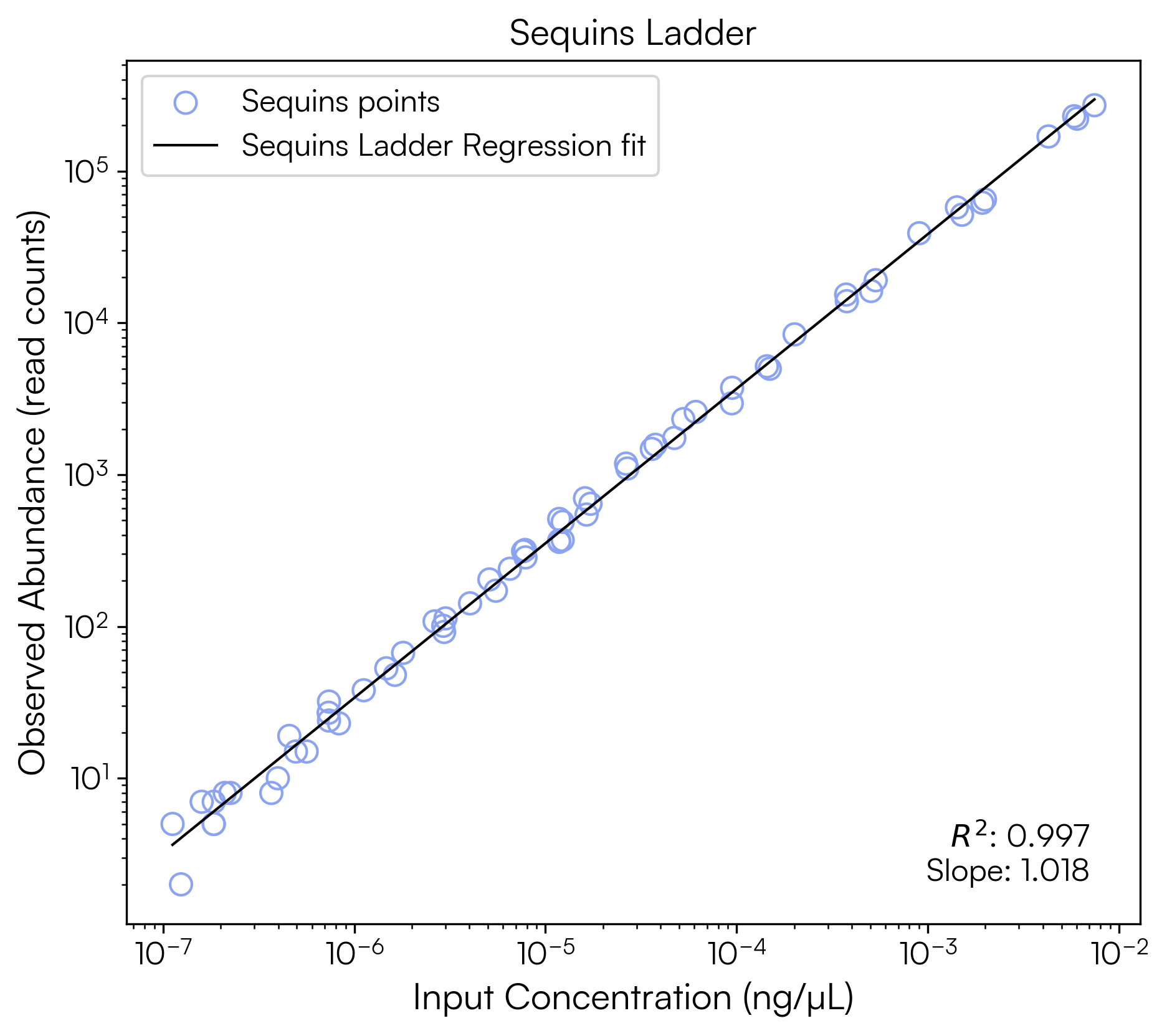
We can evaluate sequencing performance by fitting a linear regression between our log-transformed observed Sequins abundances and the log-transformed expected input values calculated above.
NOTE: Some Python helper scripts for normalising quantified read counts, plotting Sequins ladders, and calculating limit of detection/quantification are included with the tutorial example data directory
meta_taxonomy_tutorial_data_v1.1/, but are also available for download here:functions.py
To perform our analysis we will launch Python and run through the following commands to produce a plot of the Sequins ladder comparing quantified abundance in Reads per Kilobase (RPK) against input copies/µL for all Sequins:
import pandas as pd
import sys
# Add tutorial data directory to path to import helper functions
sys.path.append("meta_taxonomy_tutorial_data_v1.1")
from functions import plot_sequins_ladder, limits_calculation

# Load expected Sequins input concentrations and lengths
input_ref = pd.read_csv('meta_taxonomy_tutorial_data_v1.1/metasequin_abundances_example.csv')
input_ref = input_ref.rename(columns={'sequin_id':'name'})

# Load quantified abundances from sequencing data
quant_df = pd.read_csv('meta_taxonomy_tutorial_data_v1.1.bracken.tsv', sep='\t')

# Filter to keep only Sequins records (names starting with 'SQN')
subset_df = quant_df[quant_df['name'].str.startswith('SQN')].copy()

# Merge Sequins quantification data with known input concentrations
sqn_df = pd.merge(subset_df, input_ref, on=['name'], how='left')

# Calculate Reads per kilobase (read counts normalised for genome length)
sqn_df['RPK'] = sqn_df['new_est_reads'] / (sqn_df['length'] / 1000)

# Generate log-log linear regression plot of the Sequins ladder
gcul_model = plot_sequins_ladder(
    sqn_df,
    'gcul',
    'RPK',
    x_label='Input Concentration (gc/µL)',
    y_label='Observed Abundance (RPK)',
    title="Sequins Ladder",
    filename=None
)
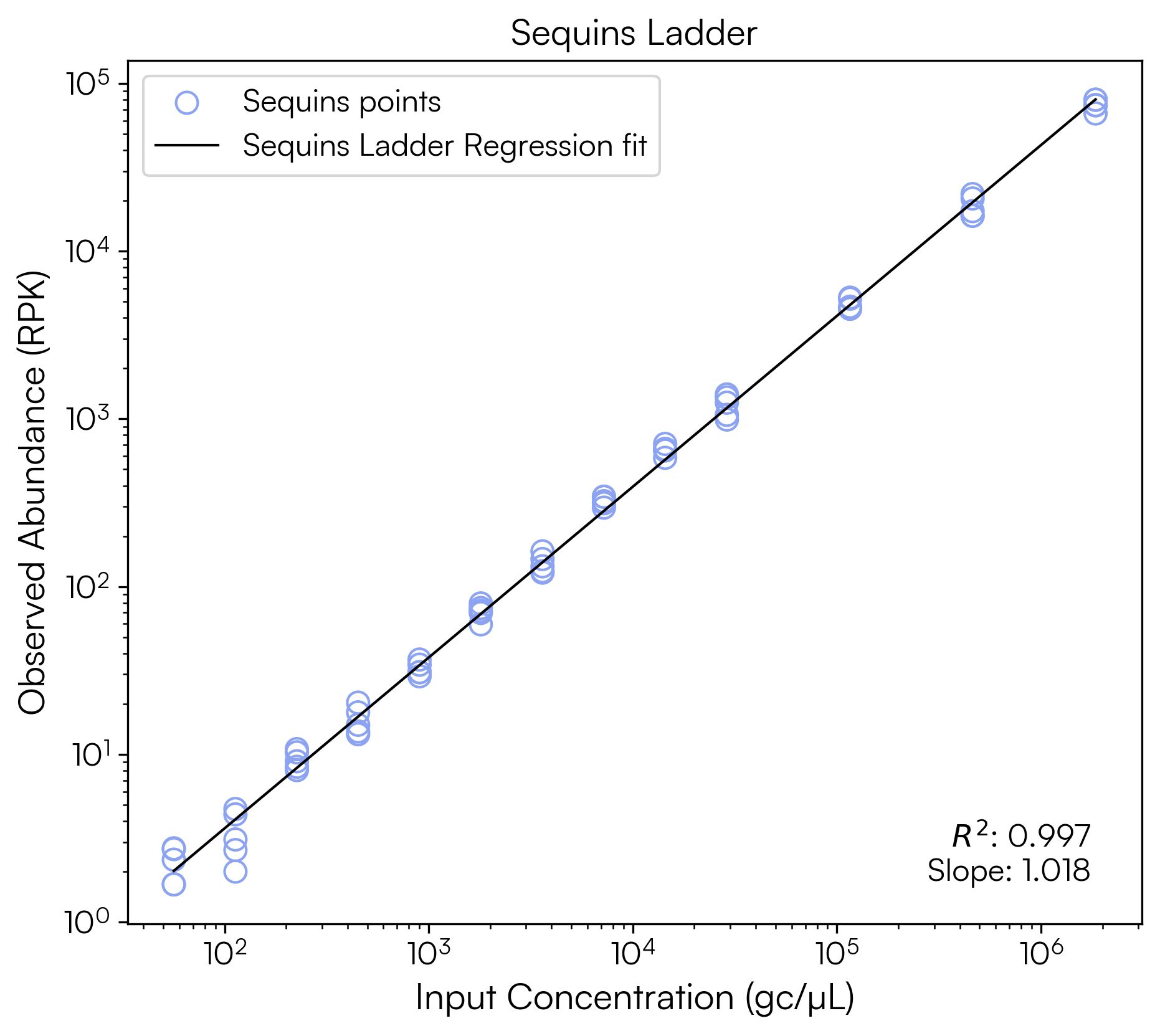
The regression yields an R² of 0.997 and a slope of 1.018, indicating good sequencing performance, with strong agreement between the expected and observed Sequins abundances and near-proportional recovery across the dynamic range.
To generate a similar ladder for raw read counts against input ng/µL:
ngul_model = plot_sequins_ladder(
    sqn_df,
    'ngul',
    'new_est_reads',
    x_label='Input Concentration (ng/µL)',
    y_label='Observed Abundance (read counts)',
    title="Sequins Ladder",
    filename=None
)
3.3 Evaluating Limit of Detection / Limit of Quantification
There are multiple methods for quantification of Limit of Detection (LOD) and Limit of Quantification (LOQ) and the appropriate approach should be selected in consideration of your experiment.
For the purpose of this tutorial we apply a simple definition of LOD as the lowest individual concentration point in the Sequins ladder at which all Sequins are detected, and define LOQ as the lowest individual concentration point in the Sequins ladder at which all Sequins are detected and at which the Coefficient of Variation (CV) is ≤ 35% for back calculated concentrations, in line with general guidelines for qPCR (Kubista et al. 2017).
In Python we can run:
loq, lod, results = limits_calculation(
    gcul_model, sqn_df,
    x_col='gcul',
    y_col='RPK',
    cv_threshold=35.0
)

results.to_csv('limit_calculation_summary.csv')

print(f"LoD = {lod:.3e}")
print(f"LoQ = {loq:.3e}")
Which returns both our LoD and LoQ for this sample as 5.640e+01 or 56.4 copies/µL, and a summary of the results at each point in the Sequins ladder:
LoD = 5.640e+01
LoQ = 5.640e+01
| known_input_concentration | all_detected | mean_backcalc | std_backcalc | cv_percent |
|---|---|---|---|---|
| 5.640e+01 | True | 6.231e+01 | 1.460e+01 | 23.43 |
| 1.130e+02 | True | 9.342e+01 | 3.118e+01 | 33.38 |
| 2.260e+02 | True | 2.530e+02 | 3.090e+01 | 12.21 |
| 4.510e+02 | True | 4.301e+02 | 7.939e+01 | 18.46 |
| 9.020e+02 | True | 8.598e+02 | 7.933e+01 | 9.23 |
| 1.800e+03 | True | 1.858e+03 | 1.884e+02 | 10.14 |
| 3.610e+03 | True | 3.543e+03 | 4.343e+02 | 12.26 |
| 7.220e+03 | True | 8.246e+03 | 5.087e+02 | 6.17 |
| 1.440e+04 | True | 1.637e+04 | 1.092e+03 | 6.67 |
| 2.890e+04 | True | 3.001e+04 | 4.330e+03 | 14.43 |
| 1.160e+05 | True | 1.175e+05 | 8.721e+03 | 7.42 |
| 4.620e+05 | True | 4.368e+05 | 6.071e+04 | 13.90 |
| 1.850e+06 | True | 1.727e+06 | 1.282e+05 | 7.42 |
Sequins abundance values and the Sequins log-log model calculated with this tutorial can be used for further downstream analyses, such as normalisation of microbial species abundances to Sequins and comparison of microbial species abundances between samples. Please refer to the Sequins Publications Guide for examples of applications of Sequins in analysis of metagenomics data.
Creating a custom taxonomic database
NOTE: Creating a custom Kraken2 database is highly resource-intensive, requiring significant disk space and computational memory. Ensure you have sufficient storage and processing power available before proceeding. If you are using a Docker container, you may need to increase the memory limit for the container to ensure it has enough resources.
NOTE: Helper scripts are provided in the
database_building/subdirectory of the tutorial example data, but are also available for download here:update_taxonomy.py,add_taxid.py
A Kraken2 database is a directory containing at least 3 files:
hash.k2d: Contains the minimizer to taxon mappingsopts.k2d: Contains information about the options used to build the databasetaxo.k2d: Contains taxonomy information used to build the database
To begin, download taxonomy data into $DBNAME/taxonomy/:
DBNAME="sequins_custom_database"
k2 download-taxonomy --db "$DBNAME"
You will need to modify the files names.dmp and nodes.dmp to be
Sequins-aware. You can run the update_taxonomy.py script to add Sequins taxonomy:
python3 update_taxonomy.py \
    --nodes $DBNAME/taxonomy/nodes.dmp \
    --names $DBNAME/taxonomy/names.dmp \
    --abundances metagenomics_core_control_set_v2/metasequin_abundances.csv
Where metasequin_abundances.csv is the abundance file provided as part
of the Sequins resource bundle. This will create a new nodes.dmp and
names.dmp in the current directory.
You then need to replace the original files with the new ones (we recommend you make a backup of the originals):
cp -a $DBNAME "${DBNAME}.backup"
mv nodes.dmp names.dmp $DBNAME/taxonomy
Next you will need to modify the Sequins FASTA file to add taxonomy IDs
to each record, which can be done using the add_taxid.py script.
The script uses biopython, so create a virtual environment if you don’t already have this installed:
python3 -m venv venv
source ./venv/bin/activate
python3 -m pip install biopython
Then run the add_taxid.py script to add the taxonomy IDs, passing the
names.dmp you produced in the previous step:
python3 add_taxid.py \
    --names $DBNAME/taxonomy/names.dmp \
    --fasta metagenomics_core_control_set_v2/metasequin_sequences.fa \
    >metasequin_sequences_with_taxid.fa
Where metasequin_sequences.fa is the FASTA file provided as part of
the Sequins resource bundle.
You can optionally download any other additional libraries of relevance
for your classification, such as archaea, bacteria, human, etc. using
k2 download-library (refer to the Kraken2 manual
for details on libraries).
k2 download-library --threads 8 --library bacteria --db "$DBNAME"
Sequins can be added to the Kraken2 database as a custom library:
k2 add-to-library --files metasequin_sequences_with_taxid.fa --db "$DBNAME"
You can now build your Kraken2 database in the usual way:
k2 build --threads 8 --db "$DBNAME"
To use Bracken for abundance estimation from the Kraken2 results, you will need to generate a Bracken database file (refer to the Bracken manual for full instructions):
bracken-build -d "$DBNAME" -t 8 -k 35 -l 150
Where -k is the k-mer length and -l is the read length.
Your custom database can now be used for taxonomic classification and abundance estimation with Kraken2 and Bracken, for both Sequins and the microbial species from the libraries you chose to download, following the steps in the above tutorial.